Packaging ML Models in Docker Containers and Running Them on Kubernetes
Getting a machine learning model out of the Jupyter Notebook where it was trained and into production remains one of the biggest choke points in today’s data science architectures. Data scientists regularly produce very accurate models on their own machines and then discover that pushing them to a live server brings version mismatches, dependency conflicts and the infamous “it works on my machine” problem. To get from a working prototype to a deployment an enterprise can rely on, engineering teams lean on containerization and orchestration. Docker for packaging plus Kubernetes for orchestration is now the accepted industry standard for AI applications that need to be scalable, resilient and highly available.
Why ML Deployment Gets Stuck
A trained machine learning model depends on a very particular ecosystem to behave correctly. That ecosystem covers the host operating system, the precise Python version, specific versions of libraries such as PyTorch, TensorFlow or Scikit-Learn, plus low-level system dependencies, for example the CUDA drivers used for GPU acceleration. Rebuilding that environment by hand with shell scripts on a staging or production server is slow, prone to mistakes and hard to audit.
Environment drift happens when the configuration of the production server departs, even slightly, from the developer’s local setup. A small version mismatch in a numerical library can make a neural network return completely different predictions, or stop the API from initializing at all. On top of that, as traffic grows, a lone server running a Python script through FastAPI or Flask will soon choke on concurrent requests. Scaling past a monolithic architecture calls for two things: a uniform packaging format for the application, and an automated layer that spreads traffic over many compute instances.
Putting the ML Model in a Docker Container
Docker removes environment drift by bundling the machine learning model, its runtime and every dependency into one isolated unit known as a container. Think of a container as a standard, executable bundle: it pairs the source code of an application with the OS-level libraries and other dependencies that code needs, so it runs reliably in any environment no matter what host infrastructure sits underneath.
Containerizing a machine learning model properly for production takes three main pieces:
- The Model Artifact: The serialized file produced by training (for example,
model.pkl,model.h5,model.pt, or an.onnxfile). - The Inference API: A script that runs a web server, usually built on FastAPI because of its asynchronous support, that loads the model into memory and offers HTTP/REST endpoints to accept data payloads and send back predictions.
- The Dockerfile: A declarative text file listing, in order, every command a user could run on the command line to put together the final container image.
Below is a practical Dockerfile, ready for production, written for a machine learning inference API built in Python:
# Use an official lightweight Python image to shrink both the exposure surface and the image size
FROM python:3.9-slim

# Set environment variables to prevent Python from writing .pyc files
# and to ensure unbuffered output for proper logging in container environments
ENV PYTHONDONTWRITEBYTECODE=1
ENV PYTHONUNBUFFERED=1

# Create a designated working directory inside the container
WORKDIR /app

# Install system-level dependencies (often required for compiling C-extensions in ML libraries)
RUN apt-get update && apt-get install -y \
    build-essential \
    libgomp1 \
    && rm -rf /var/lib/apt/lists/*

# Copy the requirements file first to aggressively leverage the Docker layer cache
COPY requirements.txt /app/

# Install Python dependencies without caching the pip packages locally to keep the image lean
RUN pip install --no-cache-dir -r requirements.txt

# Copy the rest of the application code and the serialized model artifacts
COPY . /app/

# Expose the designated port the API will run on
EXPOSE 8000

# Define the default command to execute the API using Uvicorn (ASGI server for FastAPI)
CMD ["uvicorn", "main:app", "--host", "0.0.0.0", "--port", "8000"]
Running the build with docker build -t ml-inference-api:latest . makes Docker process the instructions one after another. Placing the COPY requirements.txt step ahead of copying the remaining application code is a deliberate and important optimization. Each layer is cached separately, so installing the heavy ML dependencies (which seldom change) before copying the source code (which changes constantly during development) means the large dependency layer is rebuilt only when requirements.txt itself is edited. In a CI/CD pipeline this cuts image build times dramatically.
Going to Production: The Case for Kubernetes
Docker does an excellent job of turning an application into an immutable artifact, but it lacks the sturdy tooling needed to run hundreds of containers at once across many physical or virtual servers. A standalone Docker container that fails with an out-of-memory exception has to be restarted. A sudden jump in API traffic means new containers have to be provisioned right away. When a physical server drops offline, the containers it hosted need to be moved intelligently onto healthy servers elsewhere in the cluster.
Kubernetes, frequently shortened to K8s, is an open-source platform for orchestrating containers, first built at Google to automate the deployment, scaling and operation of application containers. For demanding machine learning workloads, Kubernetes turns a plain Docker image into a sturdy, enterprise-grade service that can handle millions of inference requests a day with no human involvement.
Essential Kubernetes Building Blocks for ML Deployments
Engineering teams that want to run a Dockerized machine learning model well in a Kubernetes cluster need to use several core K8s objects built for high availability and efficient use of resources:
1. Pods: The smallest unit of compute that Kubernetes can deploy. A pod wraps one or more containers together with storage resources and its own network IP. In a typical ML architecture, each pod runs one copy of the ml-inference-api container.
2. Deployments: This object gives Pods declarative, automated updates. The desired state is written in a YAML file (for example, “Keep exactly three instances of the machine learning model running”), and the Kubernetes Deployment Controller watches the cluster without pause, adjusting the actual state toward the desired one at a controlled pace.
Here is a typical deployment.yaml configuration adapted for deploying an ML API:
apiVersion: apps/v1
kind: Deployment
metadata:
  name: risk-scoring-model
spec:
  replicas: 3
  selector:
    matchLabels:
      app: risk-api
  template:
    metadata:
      labels:
        app: risk-api
    spec:
      containers:
      - name: inference-container
        image: registry.enterprise.com/risk-model:v2.4
        ports:
        - containerPort: 8000
        resources:
          requests:
            memory: "2Gi"
            cpu: "1000m"
          limits:
            memory: "4Gi"
            cpu: "2000m"
        livenessProbe:
          httpGet:
            path: /healthz
            port: 8000
          initialDelaySeconds: 45
          periodSeconds: 15
        readinessProbe:
          httpGet:
            path: /ready
            port: 8000
          initialDelaySeconds: 10
          periodSeconds: 5
For machine learning workloads, the resources block matters a great deal. Deep learning models that work on images or text can consume enormous amounts of memory. Defining explicit requests (the minimum compute the scheduler reserves for the pod) and limits (the hard ceiling the pod may use before it is throttled or terminated) keeps one model with a memory leak from starving whatever else shares its cluster node.
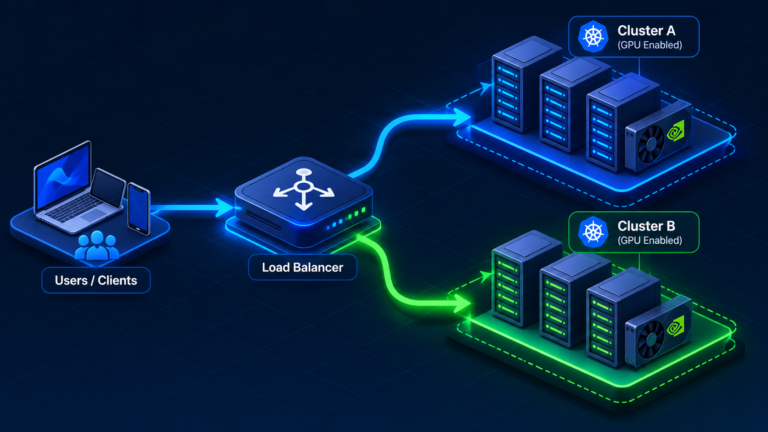
3. Services and Ingress: Pods are short-lived and are constantly torn down and recreated, so their internal IP addresses keep changing. A Kubernetes Service gives a logical group of Pods a DNS name and an IP address that stays fixed, and load-balances internal cluster traffic among them. An Ingress controller then exposes that internal Service to the public internet, sending outside HTTP/HTTPS requests to the right inference pods.
Setting Up the MLOps CI/CD Pipeline
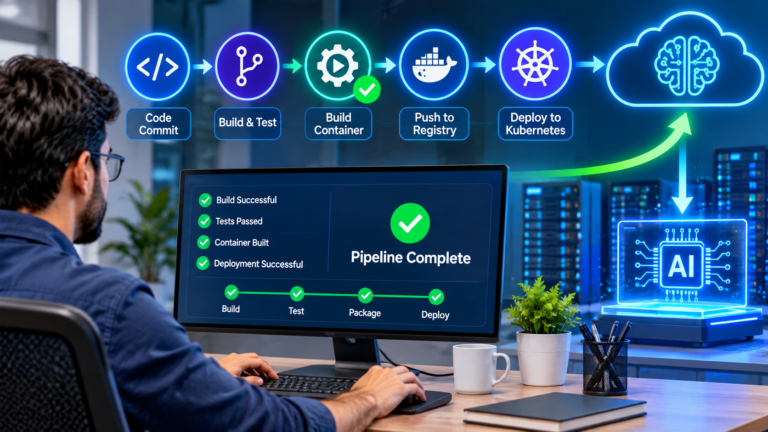
In a modern enterprise environment, deploying containerized models to Kubernetes by hand from the command line is considered an anti-pattern. A mature MLOps workflow depends on CI/CD (Continuous Integration and Continuous Deployment) pipelines that automate the lifecycle safely.
- Build and Test Stage: After retraining a model, a data scientist commits the changed code to a central Git repository, the CI server (GitHub Actions, GitLab CI, CircleCI or similar) starts automatically. It checks out the repository, runs automated unit tests against the inference logic to catch regressions, and builds the Docker image.
- Pushing to the Registry: After a successful build, the image is digitally signed, tagged with a unique version number (commonly the Git commit hash) and uploaded to a secured registry for container images such as Docker Hub, Google GCR or Amazon ECR.
- Deployment Stage: The CD pipeline writes the new image tag into the Kubernetes deployment manifests and applies them to the cluster with a tool like
kubectlor ArgoCD. Kubernetes then carries out a Rolling Update, bringing up new pods and retiring old ones step by step, which ensures the application stays available throughout the version change.
Handling State, Storage, and Model Artifacts
One of the basic best practices for containerized machine learning applications is to keep containers stateless. The Docker image should hold nothing beyond the API application code and the dependency libraries it needs. Building massive 10GB neural network weights straight into the image produces bloated, awkward images that take far too long to pull over the network, which slows auto-scaling exactly when traffic spikes.
Modern architectures instead treat external cloud storage (Google Cloud Storage, Azure Blob Storage or AWS S3, for example) as a Model Registry. As the Kubernetes Pod starts, it runs an initialization script, or relies on K8s Init Containers, to fetch the newest model weights securely out of the S3 bucket and hold them in the pod’s local memory, all before it opens the HTTP port and starts taking traffic. Separating application logic from the heavy data artifacts in this way lets developers ship API bug fixes without repackaging enormous ML files.
Autoscaling and Keeping Costs Down
Serving machine learning models, especially ones that require GPU compute, can swell cloud infrastructure budgets quickly when nobody manages it. Kubernetes ships with autoscaling features that tune these costs dynamically.
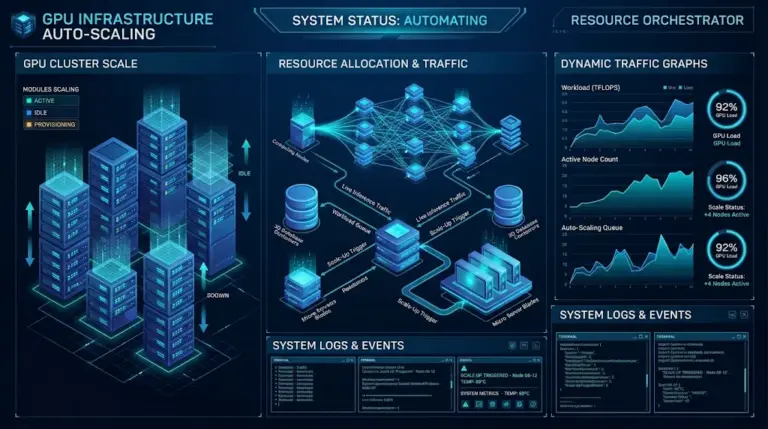
The Horizontal Pod Autoscaler (HPA) changes how many pod replicas a Deployment runs, automatically, according to metrics observed in real time. Watching CPU utilization, memory pressure, or custom metrics such as the length of the incoming HTTP request queue, the HPA works as a dynamic throttle. When traffic is heavy, it adds model pods on its own to keep response latency under a second. When demand is low, it gracefully shuts down surplus pods and scales back to a preset minimum baseline, which saves costly compute.
Frequently Asked Questions
1. How is GPU acceleration handled in Kubernetes for Deep Learning models?
Hardware acceleration requires installing the relevant device plugins on the nodes of your Kubernetes cluster; the NVIDIA Device Plugin is the usual one. With that in place, you can request a GPU explicitly in your deployment.yaml file under the resources.limits section by adding [nvidia.com/gpu](https://nvidia.com/gpu): 1, which makes sure the pod is scheduled only on a node that has graphics processing hardware.
2. Is Flask or FastAPI the better choice for serving a containerized Python model?
For modern ML application deployments, FastAPI is the near-universal recommendation over Flask. It provides native asynchronous execution through ASGI, generates OpenAPI (Swagger) documentation automatically, validates data robustly with Pydantic, and delivers considerably higher throughput when many inference requests arrive at once.
3. How does Kubernetes avoid downtime while a model version is being updated?
The default strategy in Kubernetes is a Rolling Update. After you change the image tag in the Deployment manifest, K8s starts new pods with the updated model while the pods running the previous version keep serving. K8s moves network traffic over to the new pods only once they pass their HTTP readiness probes, and then it safely terminates the outdated pods.
4. In operational terms, how does a Liveness Probe differ from a Readiness Probe?
A Liveness probe checks whether the container application is still running; when it fails, for instance because of lock contention or a process failure, K8s restarts the pod automatically. A Readiness probe checks whether the application has finished loading and can accept network traffic. Large machine learning models often need several seconds to load into memory, so a Readiness probe stops K8s from sending HTTP requests to the pod before the model has finished initializing and can return predictions.
Sources and References
- Official Docker documentation: Recommended practices for writing Dockerfiles, making use of the build cache, and containerizing Python applications for production use.
- Kubernetes documentation (kubernetes.io): How to manage container compute resources, define the Pod lifecycle, and deploying stateless as well as stateful microservices.
- MLOps principles and guidelines: Frameworks covering automated testing, Continuous Delivery, and how CI/CD pipelines fit into Machine Learning architectures.
- FastAPI deployment guidance: Recommended practices for running production-grade ASGI servers in containerized orchestration environments.