How Semantic Caching Cuts LLM Latency and Inference Costs
Enterprise applications now lean on Large Language Models (LLMs) for customer service copilots, internal knowledge search and autonomous agents, and as they do, the same two production bottlenecks keep appearing: inference cost and API latency. A casual consumer may tolerate a three-to-five-second wait while a frontier model composes its answer. In a busy B2B setting, however, a slow time-to-first-token (TTFT) hurts the user experience and makes compute spending climb exponentially.
AI system architects are responding by going past simple API tuning and adding a more capable middleware layer: Semantic Caching. Conventional web caching only works when inputs match exactly, whereas semantic caching grasps what a user’s prompt actually means. Storing and serving responses according to conceptual similarity lets enterprises lean far less on costly LLM generation, trimming API spend by as much as 40% and giving end-users answers almost instantly.
This in-depth guide covers how semantic caching works architecturally, what infrastructure it needs, and which advanced techniques bring it up to enterprise grade.
Where Traditional Caching Falls Short for AI Systems
Caching in conventional software engineering is simple. A system stores the output of costly database queries keyed by an exact string match or a hash such as MD5 or SHA-256. When a request arrives for precisely the same URL or database payload, the system skips the primary server and serves the stored result right away.
Carry that pattern over to generative AI and it stops working entirely, because natural language varies by nature. Look at these three prompts from users:
- “How can I reset the password on my account?”
- “What steps do I follow to get a new password?”
- “I can’t remember my password. How do I change it?”
An LLM would give all three the same answer. An exact-match cache, by contrast, sees three different hashes and records three cache misses. Every one of those requests then goes to the LLM, paying the full API price and the worst-case latency each time. Reaching high hit rates in conversational AI means the architecture must move away from matching syntax and toward understanding meaning.
The Building Blocks of a Semantic Cache Architecture
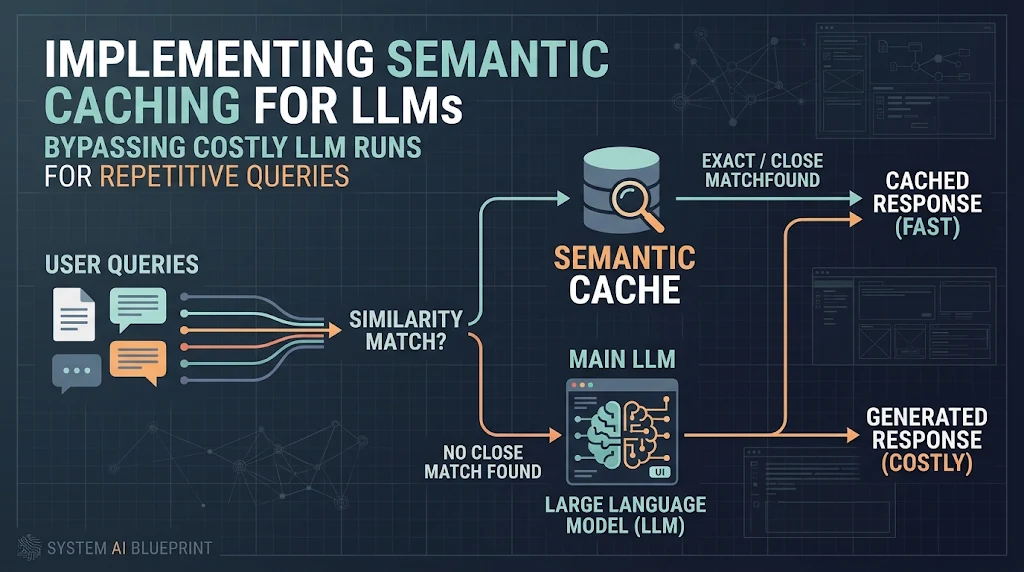
The semantic caching layer is placed directly between the application’s API gateway and the LLM being called, where it acts as a smart interception point. Architects need to bring together three essential components to build it.
1. A Very Fast Embedding Model
First comes an embedding model chosen above all for speed. Each submitted prompt is turned by this model into a high-dimensional numeric vector. Since this adds work to every request, large and sluggish embedding models are off the table. In production, teams usually run small local models such as all-MiniLM-L6-v2 or BGE-micro, which produce embeddings in milliseconds on ordinary CPU infrastructure, so the cache does not end up raising overall system latency by accident.
2. An In-Memory Vector Store
The new prompt vector then has to be compared with vectors stored earlier. Standalone vector databases such as Pinecone or Milvus are very good for large Retrieval-Augmented Generation (RAG) workloads, but a semantic cache needs much more speed. The usual architectural choice is therefore an in-memory database that supports vectors, such as Redis (through RedisVL) or a tuned in-memory Qdrant instance. Keeping everything in RAM ensures cache lookups finish in under a millisecond.
3. A Similarity Scoring Engine
Last is the engine that applies the decision logic. Once the in-memory store returns the nearest earlier prompt, the scoring engine measures the semantic distance between it and the incoming prompt, typically with Cosine Similarity. It then compares that distance with preset strictness thresholds to decide whether the match is close enough to serve the stored answer safely, without hallucination and without returning something off-topic.
Laying Out the Semantic Caching Workflow
Putting the architecture into service calls for a carefully coordinated, asynchronous workflow of four steps that inspects traffic as it arrives.
Step 1: Capturing the Query and Turning It into a Vector
As soon as an end-user’s query reaches the enterprise application, the routing layer captures the payload and hands the prompt to the lightweight embedding model. A prompt such as “Show me the Q3 revenue report,” for instance, becomes a dense vector array like [0.014, -0.452, 0.881...].
Step 2: Searching Vectors and Scoring Similarity
Next, the vector goes to the in-memory Redis cache. There, an Approximate Nearest Neighbor (ANN) search locates the stored vector closest to it, and the database reports a similarity score between 0.0, meaning entirely different, and 1.0, meaning identical.
Step 3: Serving a Cache Hit
The similarity engine checks that score against the enterprise threshold, for example 0.92. A retrieved vector scoring 0.95 produces a Cache Hit: the middleware immediately pulls the text response linked to that vector and sends it back to the user, and the costly LLM API (GPT-4, say) is skipped altogether. Round-trip time falls from 4,000 milliseconds to around 50 milliseconds.
Step 4: Handling a Cache Miss and Refreshing the Cache
When the best score reaches only 0.75, it sits under the threshold and counts as a Cache Miss. The middleware passes the original prompt text on to the primary LLM, which produces a response that goes back to the user. In the background, the middleware stores the new prompt vector together with its response in the vector cache, so a similar question asked later will register as a hit.
Advanced Caching Techniques for the Enterprise
Standing up a basic semantic cache is easy. Keeping it accurate, compliant and memory-efficient at enterprise scale is harder and depends on more advanced configuration logic.
Dynamic Similarity Thresholds
AI interactions do not all carry equal risk, so applying one fixed similarity threshold to a whole application is very wasteful. Enterprise designs instead set the threshold dynamically from the query’s context. Routine Q&A such as “What are your business hours?” can use a lower threshold of 0.85, favouring speed and savings. A high-stakes financial question like “What fee applies if I end my contract early?” should push the threshold up to 0.98, so the system leans toward a cache miss and the LLM produces the most precise, context-specific legal answer.
Controlling Eviction and Memory Limits
Under heavy traffic, an in-memory vector cache will sooner or later fill all the RAM it has. Architects therefore need well-designed eviction policies.
- Time-To-Live (TTL): Queries about finance or news should carry tight TTL limits. A stored answer to “Today’s stock price” ought to expire automatically after 5 minutes so the system never serves outdated, incorrect data.
- Vector Least Recently Used (LRU): For knowledge bases that rarely change, the system records how often each cached vector is matched. Once memory reaches 90% of capacity, the cache automatically removes the vectors that have gone unmatched for the longest time.
Dealing with Multi-Turn Conversations
For zero-shot (single prompt) queries, semantic caching works very well, but conversational agents that span several turns raise a particular difficulty. A message such as “Tell me more about that” carries no meaning of its own once it is cut off from the earlier exchange.
The answer is for the caching layer to combine the conversation history with the new message. Rather than embedding only “Tell me more about that,” the embedding model encodes the previous LLM response joined with the new prompt. The resulting vector then reflects where the conversation actually stands, and the cache can return the right follow-up answer.
Security and Privacy Within the Caching Layer
Data privacy is a top concern when deploying semantic caches. The cache necessarily keeps user prompts and LLM outputs as plain text next to their vectors, which makes it an attractive target for data exposure.
Enterprise designs need strict segmentation. Any query that includes sensitive Personally Identifiable Information (PII), for example “Summarize patient John Doe’s medical history,” has to skip the global cache completely. The routing layer should run Named Entity Recognition (NER) to spot PII before vectorization, and when it finds some, it sets a “No-Cache” header. This keeps private health data and financial records out of the shared in-memory database and preserves strict compliance with the GDPR, HIPAA and SOC2 frameworks.
Measuring the ROI of Semantic Caching
The added architectural complexity of a semantic caching layer pays for itself quickly. Take an enterprise sending 100,000 LLM queries a day to GPT-4: even a moderate 25% semantic cache hit rate removes 25,000 API calls every day. That saves thousands of dollars in direct costs each month and also shrinks the application’s computational footprint considerably. Just as important, answering a quarter of all queries in less than 50 milliseconds produces a fast, smooth user experience that conventional LLM architectures cannot equal.
Frequently Asked Questions
1. How does a semantic cache compare with the vector database used for RAG?
Both rely on vector embeddings, yet their jobs run in opposite directions. A RAG vector database holds internal company documents so it can supply context to the LLM. A semantic cache holds earlier user prompts and their answers so it can skip the LLM altogether, with speed and lower cost as its only goals.
2. What if the knowledge behind the LLM changes?
After you upgrade the LLM or change your internal RAG data, the semantic cache keeps returning old, stale answers, because it catches queries before they ever reach the updated model. Enterprise designs should therefore include an automatic cache-invalidation trigger that clears the whole Redis/Qdrant cache any time the main data source or the foundation model changes.
3. Does semantic caching suit coding or math-related AI tasks?
In general, semantic caching is a poor fit for tasks that depend on exact logic, such as coding, math or data analysis. A user who wants a Python script that sorts an array and another who wants one that sorts a linked list will produce very similar vectors while needing very different code. Caching such logic tasks tends to produce false positives, so it is better kept for summarization and Q&A in natural language.
4. Which embedding model works best for a semantic cache?
For caching, speed matters more than deep reasoning. Small local models such as all-MiniLM-L6-v2 or BGE-micro are favoured over large cloud APIs like OpenAI’s text-embedding-3. Running locally removes network latency and lets a prompt be embedded in milliseconds, so the cache check does not cancel out the speed the cache is meant to deliver.